By
Scott Taylor - Network Architect, Internet2
Estimated reading time: 3 minutes
If you operate a multicloud environment in research and education (R&E), you’re familiar with the common challenges and complexities — from access management and security to right-sizing capacity and optimizing spend. But there are lesser-known risks that emerge as cloud use expands.
When a member institution recently lost connectivity to critical cloud resources, it wasn’t due to fiber cuts, hardware failure, or security compromise. It was a routing constraint that any institution scaling its multicloud footprint could encounter.
What followed was more than a quick technical fix. This blog offers a closer look at what happened, why it matters, and takeaways to consider as R&E institutions continue to grow their cloud environments.
The Scenario: A Multicloud Environment Under Pressure
The institution, connected to Internet2 through regional network OSHEAN, uses Internet2 Cloud Connect and the Virtual Networks Cloud Router in Insight Console for connectivity to both Microsoft Azure and AWS.
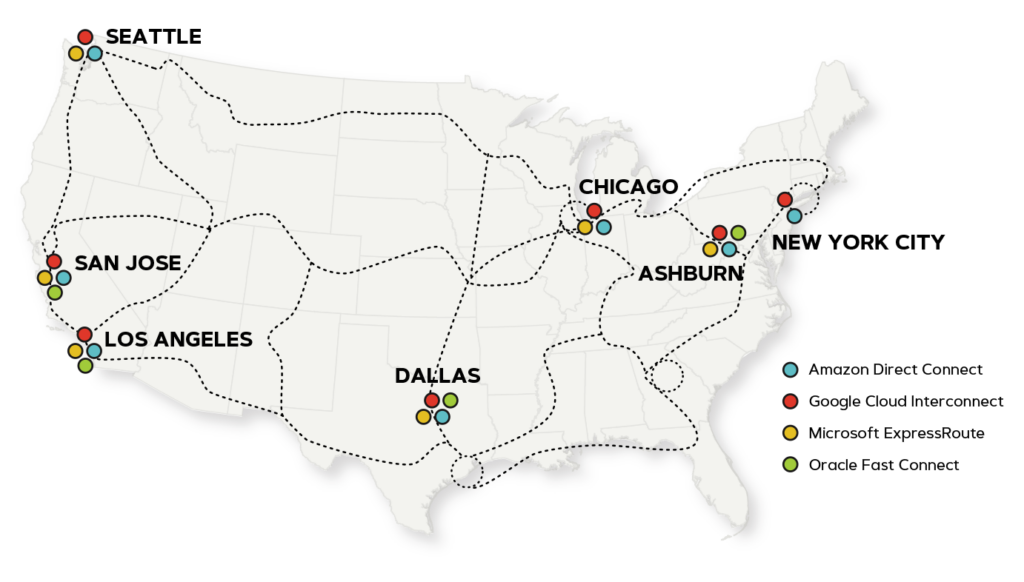 Internet2 Cloud Connect locations and cloud providers
As the institution’s multicloud footprint grew, so did the number of Border Gateway Protocol (BGP) prefixes being announced to AWS Direct Connect. Once those announcements exceeded AWS DirectConnect’s 100-prefix limit, the BGP peering session failed completely — cutting off access to business-critical systems.
For CIOs and network operators, this type of failure is particularly disruptive because it doesn’t resemble a traditional outage. The physical connection is intact, and the interfaces are up. But a cloud provider-enforced routing limit brings the session down. This is where proactive controls can make all the difference.
OSHEAN engaged with Internet2 immediately, aware that we were already developing a new Route Policy capability in Insight Console to address this type of multicloud scaling issue. Given the urgency, the team decided to accelerate the release of Route Policy to address this community need.
This is the advantage of a community-driven advanced network. Development priorities are shaped by real-world scenarios and the operational requirements of Internet2 member institutions.
The Solution: Putting Route Policy Into Use
Working collaboratively, Internet2 developers and engineers joined OSHEAN during a scheduled maintenance window to implement routing policies that filtered excess prefixes. OSHEAN engineers applied the policies using Virtual Networks Cloud Router and verified proper functionality using Looking Glass — all within Insight Console.
The team successfully reestablished AWS peering sessions, restoring connectivity.
Strategic Takeaways for Multicloud in R&E
This incident validated the reason for developing Route Policy in the first place: as multicloud environments grow in scale and complexity, routing controls are becoming foundational infrastructure for resilient R&E connectivity.
The Internet2 Cloud Connect service with Route Policy capabilities helps institutions:
- Manage sophisticated connectivity requirements across AWS, Azure, Google Cloud, and Oracle Cloud Infrastructure
- Maintain operational resilience for research, teaching, and administrative systems
- Leverage self-service tools through Insight Console for network management
- Benefit from responsive, personalized support grounded in community collaboration
More broadly, this wasn’t just a one-off fix. Route Policy is now available to any network engineer or cloud architect using Insight Console’s Virtual Networks Cloud Router to manage connectivity, enabling sophisticated traffic engineering and prefix controls through a single interface.
If you have questions or want more information about Internet2 Cloud Connect, Cloud Router, or Route Policy in Insight Console, email cloudconnect_request@internet2.edu.
ICYMI
About the Author(s)
Scott Taylor is a Network Architect at Internet2. He has over 20 years of experience in networking and is passionate about connecting networks together. He recently led the Internet2 NGI Packet Platform Selection and was formerly the Director of Connecticut Education Network (CEN), an R&E network serving Connecticut.